
Palmstreet: Buy & Sell LIVE
Plant StoryHouse & Home
4.6624.00 Reviews
- Version
- 8.90.0
- Installs
- 100.00K
- Age Rating
- Everyone
Screenshots
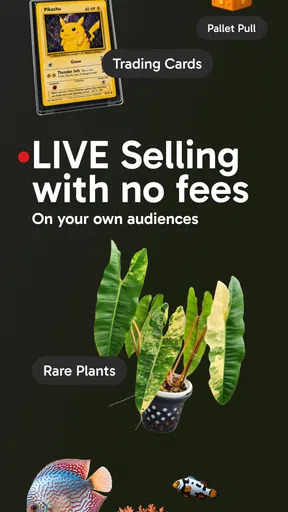
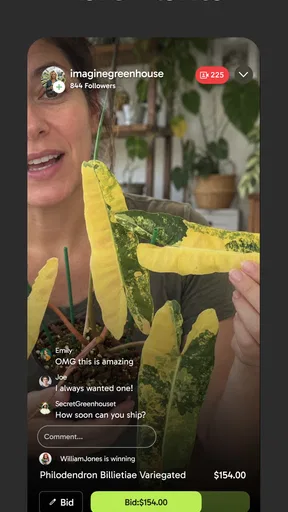
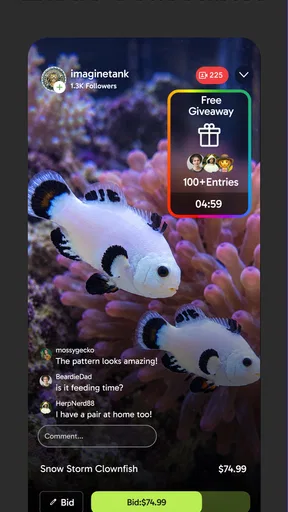
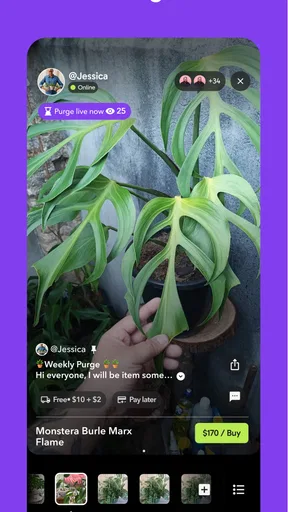
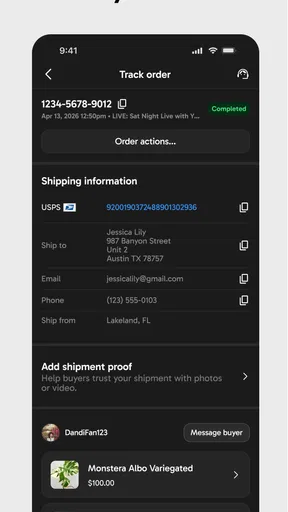
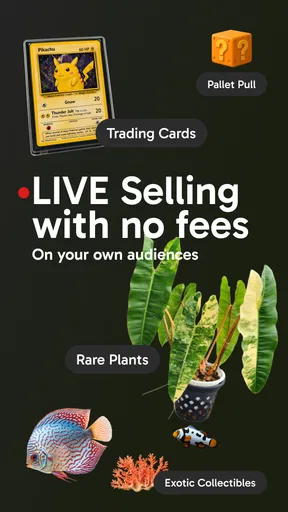
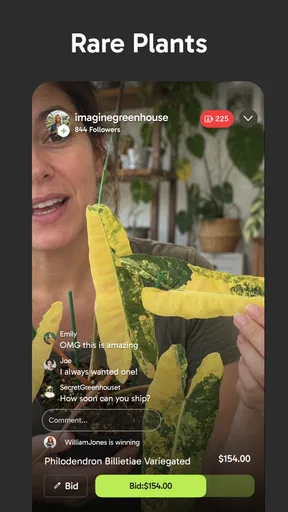
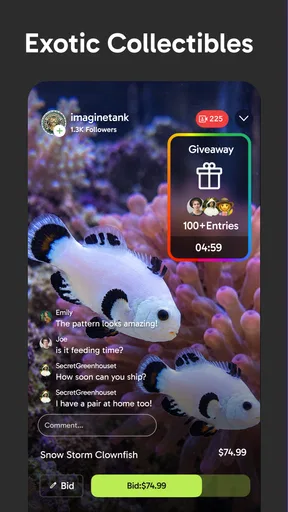
Our Review of Palmstreet: Buy & Sell LIVE
 Analysis by Appyee
I find Palmstreet easiest to understand when I treat it less like a row of listings and more like a shop floor that happens to be live. That shift changes what I look for: instead of judging an item from a few photos alone, I can listen to the seller describe it and decide whether the details suit me. The format is appealing, but it also asks for more attention than browsing a conventional marketplace. A stream moves at its own pace, so it helps to arrive with a clear idea of what you want rather than expecting every visit to be quick.
Where the live format can trip you up
The main point of friction is timing. A live presentation is useful when you can watch and participate, but it is less convenient if you only have a moment to search, compare, and leave. You may need to wait for a relevant item to appear or catch the part of a stream where the seller explains it. I would not open the app expecting every product question to be answered instantly; the seller may be focused on the broadcast or responding to other viewers.
There is also a difference between seeing something on camera and knowing everything you need to know about it. A close-up or demonstration can clarify appearance and condition, but it is still sensible to ask direct questions about the details that matter to you. Before buying, I would confirm the item, price, and any relevant terms in the purchase flow rather than relying on a quick impression from the video. That small pause makes live shopping more useful and less impulsive.
For sellers, the same immediacy has a trade-off. A live session gives you a chance to explain an item and respond in the moment, but it also means you need to be ready to speak clearly, keep track of questions, and show the product in a way viewers can follow. If you would rather prepare a listing quietly and let it sit until someone finds it, a standard marketplace may suit your habits better.
Simple checks before you browse or sell
When I want a useful session rather than aimless scrolling, I decide what I am hoping to find first. A short note with the item type, acceptable price range, and questions I need answered helps me stay focused when the stream moves quickly. If I am only exploring, I keep expectations looser and treat the visit as browsing, not as a promise that the right item will appear on demand.
For a seller, preparation matters more than elaborate production. Put the item within easy reach, check that it can be shown clearly, and think through the facts a buyer is likely to ask about. A simple plan for what to show first can keep the broadcast from turning into a scramble. I would also test the basic setup before inviting people to watch, especially if I am new to presenting live; a calm start is easier for both the seller and the audience.
Plant Story develops Palmstreet as a House & Home app, and that context makes the marketplace feel most at home when browsing and selling fit naturally into everyday interests around the home. It is free to install, carries an Everyone age rating, and has a 4.7 average from around 3,800 ratings, with over 100,000 installs. The app first appeared on November 4, 2020, and version 8.65.0 lists Android 7.0 as its minimum operating system. Optional in-app purchases range from $2.49 to $49.99 per item, so I would check any charge shown before confirming it rather than assuming every part of the experience costs nothing.
Recovering when a session does not go smoothly
If a stream is hard to follow, I would first try the ordinary fixes: check that the connection is steady, close and reopen the app, and return to the stream if it is still available. If the video is clear but a question gets missed, asking it again briefly is more practical than sending several versions at once. The live setting can be busy, and a concise question is easier for a seller to notice and answer.
If you are selling and something interrupts your broadcast, avoid rushing through the remaining items just to get back on schedule. Pause, make sure you can continue comfortably, and explain where you are in the presentation when you resume. If the app itself seems unresponsive, restarting it and checking for an available update are reasonable first steps. For a purchase concern, keep the item and transaction details handy when seeking help through the appropriate in-app route.
When another approach makes more sense
Palmstreet is not automatically a better choice than every other way to shop. A conventional marketplace is often more practical when you want to compare many fixed listings at your own pace, search a very specific phrase, or avoid watching video. A local classifieds service may fit better when collecting an item nearby is central to the deal. For sellers, a prepared listing can be less demanding than a live appearance if you do not enjoy speaking on camera or managing questions in real time.
The advantage here is the chance to see a seller present an item and ask about it while the conversation is happening. That can be especially helpful when visual details matter and a still image leaves you uncertain. The trade-off is that a stream cannot guarantee a perfect view, an immediate answer, or a match for your schedule. I see the app as a useful extra route to discover and discuss items, not a replacement for every marketplace or a reason to skip normal buying judgment.
The Live Shopping Experience
Okay, so here’s the deal with Palmstreet. Traditional online marketplaces are great, but they can feel a bit static, right? You scroll through listings, maybe exchange a few messages, and then make a purchase. With Palmstreet, it’s a whole different ballgame. The app allows sellers to host live streams where they can showcase their items in real-time. It’s like a digital QVC, but way more interactive.
As a buyer, you can join these live streams, ask questions, and even negotiate prices on the spot. It’s all very engaging, and it feels a lot more personal than just clicking "buy now" on a standard listing. Plus, you get to see the item in action, which helps in making more informed decisions.
Setting Up Shop
Now, if you’re thinking about selling, Palmstreet makes it super easy to set up your own live stream. You just need to create an account and you’re good to go. The app provides some handy tools to help you broadcast smoothly. You can schedule your live sessions, promote them within the app, and even share them on social media to reach a wider audience.
One of the coolest features is the real-time chat. During your live stream, viewers can send you messages, and you can respond directly. This not only makes the experience more interactive but also builds trust with potential buyers.
Community and Engagement
What I love about Palmstreet is the sense of community it fosters. The live format encourages more genuine connections between buyers and sellers. You’re not just a faceless username; you’re a real person interacting with others in real time. This adds a layer of authenticity and trust that you just don’t get on other platforms.
Plus, the app has a fun, lively atmosphere. There’s something exciting about watching a live stream, waiting to see what items will be showcased next. And for sellers, it’s a chance to show off their personality and build a loyal following.
Navigating the App
The user interface is pretty intuitive, which is always a plus. When you open the app, you’re greeted with a feed of ongoing and upcoming live streams. You can browse by category or search for specific items. Once you find a stream you’re interested in, just tap to join and start watching.
Buying an item during a live session is straightforward. There’s usually a "buy now" button that takes you through the purchase process. Payments are handled securely within the app, so you don’t have to worry about your personal information being compromised.
Who gets the most from it
I think the strongest fit is someone who enjoys discovering things through conversation rather than treating shopping as a checklist. If you like seeing an item handled, hearing a seller explain why it is worth a closer look, and asking a question before deciding, the live approach adds something a static listing cannot. It can also suit a small seller who is comfortable presenting, since a clear demonstration can communicate more personality than a short written description.
It is less compelling for a shopper who already knows the exact model or item they need and wants the fastest possible route to a comparable price. In that situation, search-led listings are usually more efficient. I would also skip the live format when I cannot give a stream my attention: dropping in and out may mean missing the explanation that makes a particular item interesting. The app works best as a deliberate browse, not as background noise while making a decision.
A realistic way to use a session
Imagine I have a few minutes after dinner and want to look for a distinctive item for a room at home. Rather than entering a stream with no plan and being swept along by whatever appears, I would decide what style or practical detail matters, join a relevant broadcast, and keep two or three questions ready. I might ask about dimensions, visible wear, or how the item is presented, then wait for a clear answer before deciding whether to proceed. If the stream does not cover what I need, I can leave without turning curiosity into a purchase.
For a seller, a similar routine is to group the items for a session, make sure each can be shown without awkward searching, and state the key details as it comes up. When several viewers ask questions, answering the ones that affect a buyer’s decision first keeps the presentation useful. This is a practical advantage of live selling, but it also exposes a limitation: the experience depends on the seller being prepared and on viewers being able to follow the conversation.
What to expect from the community
The social side is more than decoration because the live exchange can help a buyer judge how clearly a seller communicates. Still, friendliness should not replace common sense. I treat a warm conversation as a reason to ask better questions, not as proof that an item is automatically right for me. That distinction matters on any marketplace, and it is especially easy to forget when a lively stream makes a purchase feel spontaneous.
For sellers, audience interaction can make a broadcast feel less like a sales pitch and more like a conversation, but it does not guarantee a crowd or a sale. Scheduling and sharing a session can help people discover it, yet the seller still needs a useful presentation and realistic expectations. I would start with a manageable selection and learn which explanations viewers find helpful before building a whole selling routine around live sessions.
Costs, confidence, and deciding to buy
The app is free, but that does not mean every purchase or optional in-app item is free. I would distinguish the cost of installing the app from the price of anything offered through it, and review the amount shown at checkout before confirming. If a live conversation makes me feel rushed, I take that as a cue to pause. A useful stream should help me make a better decision, not pressure me into one before I have understood what I am buying.
When I am unsure, I compare the live presentation with the information I would normally want from a listing: what exactly is being sold, what condition it is in, and whether the price makes sense for me. The camera gives context, while a direct question can fill a gap, but neither removes the need to make my own judgment. That balanced approach is the best way to enjoy the interactive side without treating the excitement of a broadcast as a substitute for careful shopping.
Final Thoughts
Overall, Palmstreet: Buy & Sell LIVE is a refreshing take on online marketplaces. The blend of live streaming with e-commerce creates a unique, engaging experience that both buyers and sellers can appreciate. Whether you’re looking to snag some deals or sell your stuff in a more dynamic way, this app is definitely worth checking out.
If you’re tired of the same old online shopping routine, give Palmstreet a try. It might just change the way you think about buying and selling online. Happy shopping!
Verdict
Strengths of Palmstreet: Buy & Sell LIVE
- User-friendly interface for seamless navigation.
- Real-time chat feature enhances communication.
- Variety of categories for diverse listings.
- Live streaming options for interactive sales.
- Secure payment system ensures safe transactions.
Limitations of Palmstreet: Buy & Sell LIVE
- Limited to certain geographic regions.
- Occasional delays in customer support response.
- Requires stable internet for optimal use.
- Some features hidden behind in-app purchases.
- Notifications can be overwhelming at times.
Similar Picks in This Category
View All
Universal TV Remote Control
CodeMatics Media Solutions3.9

AlfredCamera Home Security app
Alfred Systems Inc.4.7

Planner 5D: AI Home Design
Planner 5D4.5

Universal Tv Remote-Cast to TV
One Music Player4.1

Zillow: Homes for Sale & Rent
Zillow Group4.8

99acres Buy/Rent/Sell Property
infoedge.com4.3
Frequently Asked Questions
What is Palmstreet: Buy & Sell LIVE?
Palmstreet: Buy & Sell LIVE is a dynamic marketplace app that allows users to engage in live buying and selling of various products. The app provides a platform for users to connect, chat, and transact in real-time, enhancing the overall shopping experience with live interactions and instant feedback.
How does the live selling feature work in Palmstreet?
The live selling feature in Palmstreet allows sellers to host live sessions where they can showcase products to potential buyers in real-time. Buyers can view the products, ask questions, and make purchases during these live events, creating an interactive shopping experience similar to a live auction or QVC-style sale.
Is Palmstreet: Buy & Sell LIVE free to use?
Yes, Palmstreet is free to download and use. However, certain features or premium services within the app may require in-app purchases or subscription fees. These options provide enhanced functionalities for both buyers and sellers, such as advanced analytics or priority listings.
What safety measures are in place for transactions on Palmstreet?
Palmstreet prioritizes user safety by implementing secure payment gateways and offering buyer and seller protection policies. Users are encouraged to use the app’s secure messaging and payment systems to avoid fraud. The app also provides a rating and review system to foster trust within the community.
Can I use Palmstreet internationally?
Palmstreet is designed for both local and international use, depending on availability in your region. Users can list products for local pickup or opt for international shipping if the seller provides it. The app supports multiple currencies and languages to facilitate a global marketplace environment.
